GitOps Beyond Kubernetes
Most ECS deployment guides end at aws ecs update-service. This article goes further: a complete GitOps setup where Git is the source of truth for what’s deployed, CloudFormation GitSync is the CD engine, and the only thing CI writes to the deployment repo is an image tag. You’ll find the architecture decisions (SSM over CloudFormation exports, separate sync and execution roles, why templates live in the GitOps repo), the anti-patterns to avoid, and three companion repos you can fork to run the whole thing yourself.
The script that everyone copies and nobody questions
Somewhere in almost every ECS project, there’s a deployment script that looks like this:
TASK_DEF=$(aws ecs describe-task-definition --task-definition my-app)
NEW_TASK_DEF=$(echo "$TASK_DEF" | jq '
  .taskDefinition |
  del(.taskDefinitionArn, .revision, .status, .requiresAttributes,
      .compatibilities, .registeredAt, .registeredBy)' |
  jq --arg IMAGE "$NEW_IMAGE" '.containerDefinitions[0].image = $IMAGE')
aws ecs register-task-definition --cli-input-json "$NEW_TASK_DEF"
aws ecs update-service --cluster my-cluster --service my-app \
  --task-definition my-app:$NEW_REVISION
It works. Teams ship it. Then they copy it into the next project, tweak the jq filters, and ship it again.
But this script has a fundamental problem: the AWS API is the source of truth, not your code. If someone edits the task definition in the console — adds an environment variable, changes the memory, tweaks a log configuration — the next CI run dutifully picks up that change with describe-task-definition and bakes it into the new revision. Console edits become permanent. There is no audit trail, no review process, no way to diff what changed.
AWS keeps adding fields to the describe-task-definition response. Every new field (registeredAt, registeredBy, ephemeralStorage) breaks existing jq filters unless you delete it. The Terraform community has been dealing with the fallout since 2017 — the provider issue tracking this cycle has been open for almost a decade.
This is the script that every team writes, and the problem that GitOps solves.
What GitOps actually means for ECS
GitOps is a loaded term. In the Kubernetes world, it usually means ArgoCD or Flux watching a Git repository and reconciling cluster state. That’s a pull-based model — the operator inside the cluster detects drift and corrects it.
ECS has no operator. There’s nothing running inside your cluster that can watch a Git repo and reconcile. So GitOps on ECS must be push-based: something detects a change in Git and pushes it to AWS.
But the core principle still applies: Git is the source of truth for what’s deployed. Not the AWS API. Not a CI pipeline’s environment variables. Not a console edit. If you want to know what’s running in production, you look at a file in a Git repository. If you want to change what’s running, you change that file.
The practical implications:
- Task definitions live in version control, not in the output of
describe-task-definition. - Deployments are git commits, not CI pipeline runs. The pipeline builds images; a separate process deploys them.
- Rollback is a git revert, not “find the previous task definition revision number.”
- Drift is detectable by comparing the git state to the running state.
This last point deserves emphasis. The describe→jq→register chain doesn’t just lack an audit trail — it actively prevents drift detection. If the API response is the source of truth, then by definition there can be no drift. GitOps inverts this: the git repository is authoritative, and any difference between git and the running system is a problem to fix.
The two-pipeline model
Mauricio Salatino’s Platform Engineering on Kubernetes introduced a clean separation that maps directly to ECS: the service pipeline and the environment pipeline.
The service pipeline is CI. It takes source code, runs tests, builds a Docker image, and pushes it to a registry. Its only output is a versioned container image. It knows nothing about environments, clusters, or deployment targets.
The environment pipeline is CD. It takes a container image reference and deploys it to a specific environment. It knows nothing about source code, tests, or build tools. Its source of truth is a configuration repository — the GitOps repo.
The contract between them is the image tag. The service pipeline produces 123456789.dkr.ecr.us-east-1.amazonaws.com/shrinkr/api:sha-a1b2c3d. The environment pipeline consumes it.
This separation is powerful because each pipeline can evolve independently. You can change your build tool without touching deployments. You can change your deployment strategy without touching CI. And critically, the two repos have different access patterns: developers push to the app repo frequently; the GitOps repo changes only when something needs to deploy.
For this article, we’ll implement both:
- shrinkr — A URL shortener with two services (API + analytics worker). The service pipeline.
- shrinkr-gitops — CloudFormation templates and deployment configuration. The environment pipeline.
Architecture overview
┌──────────────────────────────────────────────────────┐
│  shrinkr (app repo)                                  │
│                                                      │
│  push to main → CI: test → build → push to ECR      │
│                          → open PR in gitops repo    │
└──────────────────────────┬───────────────────────────┘
                           │ PR: update ImageUri
                           ▼
┌──────────────────────────────────────────────────────┐
│  shrinkr-gitops                                      │
│                                                      │
│  environments/devstg/api.deployment.yml              │
│    ImageUri: 123456.dkr.ecr.../shrinkr/api:sha-abc   │
│                                                      │
│  merge to main → CloudFormation GitSync detects      │
│                → stack update → ECS rolling deploy   │
└──────────────────────────────────────────────────────┘
Three CloudFormation stacks per environment:
| Stack | What it manages |
|---|---|
shrinkr-infra-{env} | VPC, ALB, ECS Cluster, SQS, S3, ECR, IAM |
shrinkr-api-{env} | API task definition + ECS service + ALB target group |
shrinkr-worker-{env} | Worker task definition + ECS service |
The infra stack rarely changes. The service stacks change on every deployment — a new image tag means a new task definition revision and a rolling ECS update. Separating them means CloudFormation only redeploys what actually changed.
SSM as the glue
A subtle but important design decision: the service stacks don’t use Fn::ImportValue to read outputs from the infra stack. Instead, the infra stack writes every output to SSM Parameter Store under two namespaces:
/platform/ecs/cluster-name          shared infra — reusable across apps
/platform/vpc/id
/platform/alb/listener-arn
/platform/ecs/task-execution-role-arn

/shrinkr/sqs-queue-url              app-specific resources
/shrinkr/api/task-role-arn
/shrinkr/api/log-group
The service templates consume these via AWS::SSM::Parameter::Value<String> parameter types with defaults. CloudFormation resolves the SSM path to the actual value at deploy time.
Why not Fn::ImportValue? Because it creates a hard coupling to CloudFormation. If you later manage infrastructure with Terraform, CDK, or even manual setup — as long as the SSM parameters exist at the expected paths, the service stacks work without modification. The SSM namespace is the contract, not the CloudFormation export.
The split also reflects organizational reality: platform params (/platform/*) are owned by the infrastructure team and shared across apps, while app params (/shrinkr/*) are scoped to this project. If each environment is a separate AWS account, you don’t even need an environment segment in the path — the account boundary provides the isolation.
Since the templates declare defaults for every SSM-backed parameter, deployment files only need to specify what actually changes per deploy:
# environments/devstg/api.deployment.yml
template-file-path: templates/api.yml
parameters:
  Environment: devstg
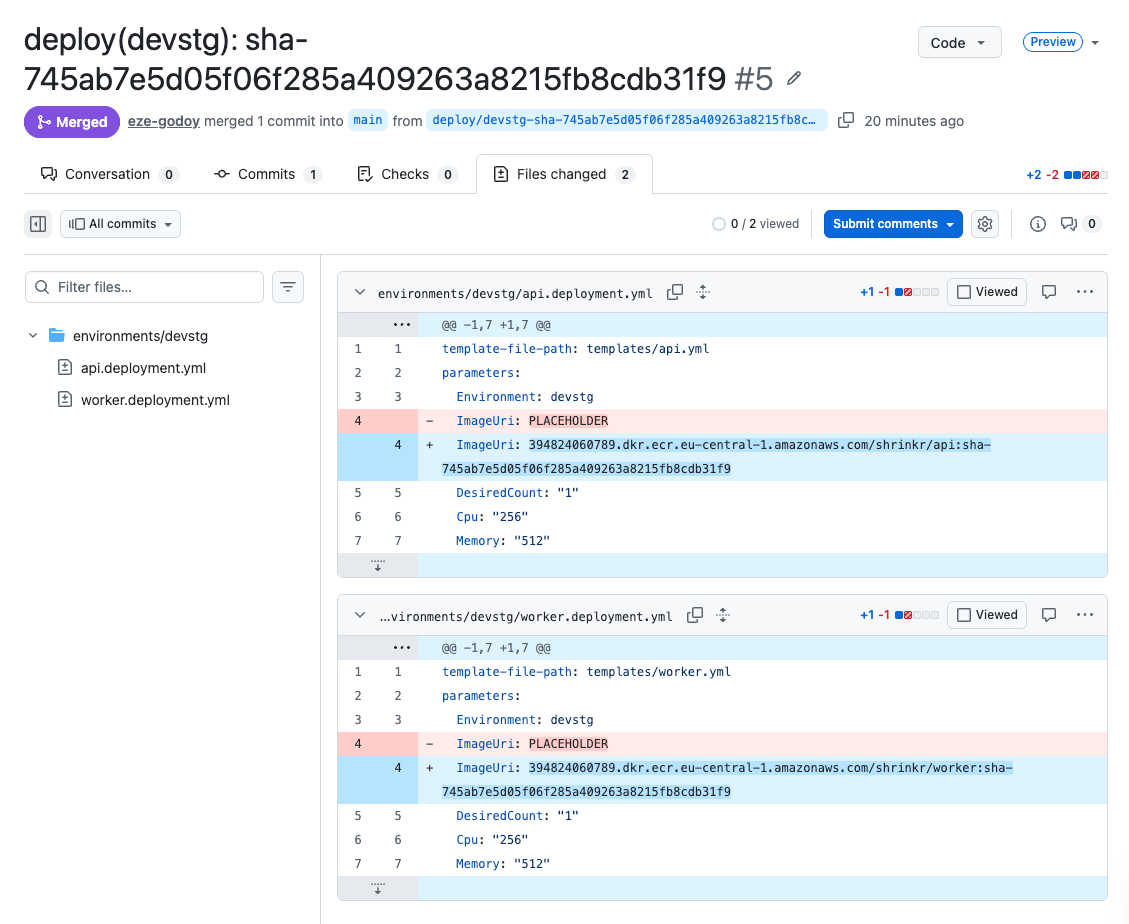
  ImageUri: 123456789.dkr.ecr.us-east-1.amazonaws.com/shrinkr/api:sha-a1b2c3d
  DesiredCount: "1"
  Cpu: "256"
  Memory: "512"
Five parameters instead of fifteen. The ImageUri is the only thing that changes on every deployment. Everything else — cluster, subnets, roles, queues — resolves from SSM defaults.
The app: Shrinkr
Shrinkr is a URL shortener with two services:
- API — FastAPI service behind an ALB. Creates short links, handles redirects, publishes click events to SQS.
- Worker — Background processor. Consumes click events from SQS, aggregates stats, writes analytics reports to S3.
The services are intentionally simple — the focus of this article is the deployment pipeline, not the application logic. The API is about 60 lines of FastAPI. The worker is a straightforward SQS poll loop with a flush timer.
For this first article, both services are stateless. The API keeps links in an in-memory dictionary (yes, they’re lost on restart — that’s fine for a demo). A future article in this series will add PostgreSQL and cover database migrations on ECS.
Each service has its own Dockerfile and pyproject.toml. Separate images keep each service’s dependency surface small — the API doesn’t need the worker’s S3 upload logic and vice versa.
# services/api/Dockerfile
FROM ghcr.io/astral-sh/uv:python3.12-bookworm-slim AS builder
ENV UV_COMPILE_BYTECODE=1 UV_LINK_MODE=copy UV_NO_DEV=1 UV_PYTHON_DOWNLOADS=0
WORKDIR /app
RUN --mount=type=cache,target=/root/.cache/uv \
    --mount=type=bind,source=uv.lock,target=uv.lock \
    --mount=type=bind,source=pyproject.toml,target=pyproject.toml \
    uv sync --locked --no-install-project
COPY . /app
RUN --mount=type=cache,target=/root/.cache/uv \
    uv sync --locked --no-editable

FROM python:3.12-slim-bookworm
RUN apt-get update && apt-get install -y --no-install-recommends curl \
    && rm -rf /var/lib/apt/lists/*
RUN groupadd --system --gid 999 app \
    && useradd --system --gid 999 --uid 999 --create-home app
COPY --from=builder --chown=app:app /app /app
ENV PATH="/app/.venv/bin:$PATH"
USER app
WORKDIR /app
EXPOSE 8000
HEALTHCHECK --interval=30s --timeout=5s --start-period=10s --retries=3 \
    CMD curl -f http://localhost:8000/health || exit 1
CMD ["uvicorn", "shrinkr_api.main:app", "--host", "0.0.0.0", "--port", "8000"]
Multi-stage build with uv sync --locked (the lockfile is the source of truth for reproducible builds), non-root user, health check. The --locked flag is important — it fails the build if uv.lock doesn’t match pyproject.toml, catching dependency drift before it reaches production. The health check is what the ALB target group uses to determine if a task is healthy during rolling deployments.
The CI pipeline
The service pipeline is a single GitHub Actions workflow that runs on push to main:
jobs:
  changes:
    # dorny/paths-filter detects which services changed
    # services/api/** → build API
    # services/worker/** → build worker

  test-api:
    needs: changes
    if: needs.changes.outputs.api == 'true'
    # uv pip install, ruff check, pytest

  test-worker:
    needs: changes
    if: needs.changes.outputs.worker == 'true'
    # same pattern

  build-and-push:
    needs: [changes, test-api, test-worker]
    # For each changed service:
    #   1. Configure AWS credentials (OIDC federation, not long-lived keys)
    #   2. Login to ECR
    #   3. Build + tag with sha-<commit_hash>
    #   4. Push to ECR

  update-gitops:
    needs: build-and-push
    # 1. Clone shrinkr-gitops
    # 2. Update ImageUri in environments/devstg/<service>.deployment.yml
    # 3. Commit, push branch, create PR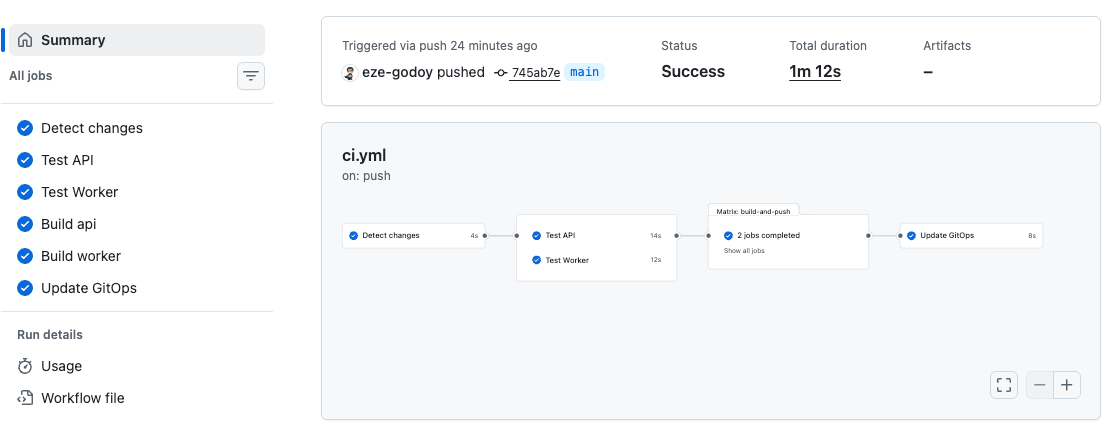
A few decisions worth explaining:
Selective builds with dorny/paths-filter. If only the API changed, don’t rebuild the worker. In a monorepo, this prevents unnecessary image pushes and deployment churn.
Image tags are sha-<commit_hash>, never latest. The latest tag is mutable — it points to different images at different times. This breaks the core GitOps guarantee: if the deployment file says latest, you can’t know what’s actually deployed by reading git. A commit SHA is immutable. The deployment file records exactly which code is running.
OIDC federation, not IAM access keys. The workflow uses aws-actions/configure-aws-credentials with role-to-assume. No long-lived secrets to rotate. GitHub proves its identity to AWS via OIDC, and AWS grants temporary credentials scoped to the specific role.
Cross-repo authentication via GitHub App. The CI workflow in shrinkr needs to push branches and create PRs in shrinkr-gitops. A dedicated GitHub App with scoped permissions (Contents + Pull Requests on the gitops repo only) generates short-lived installation tokens at runtime — no personal access tokens to rotate.
The GitOps update creates a PR, not a direct commit. Even for automated devstg deployments, the change goes through a pull request. This gives you an audit trail (who triggered what, when), the ability to enable auto-merge for devstg while requiring manual review for prod, and a clean revert path if something goes wrong.
The GitOps repo
The shrinkr-gitops repository has a deliberately simple structure:
templates/
  infra.yml         CloudFormation template — VPC, ALB, ECS, SQS, S3, ECR, IAM
  api.yml            ECS task definition + service for the API
  worker.yml         ECS task definition + service for the worker
environments/
  devstg/
    infra.deployment.yml
    api.deployment.yml        ← this is what CI updates
    worker.deployment.yml
  prod/
    infra.deployment.yml
    api.deployment.yml
    worker.deployment.yml
Templates are shared across environments. Only the deployment files differ — they contain environment-specific parameter values (instance counts, CPU/memory, and most importantly, the image tag).
Should templates live in the app repo?
This is the question I debated longest. The research literature recommends keeping the task definition template in the app repo, since developers “own” the container’s shape (CPU, memory, ports, log config). The gitops repo would store only the image tag and environment overrides.
But CloudFormation GitSync requires the template to be in the repo it watches. The template-file-path in the deployment file must point to a local file. You could work around this with S3 template URLs or git subtrees, but both add complexity that obscures the pattern you’re trying to teach.
My decision: templates live in the GitOps repo. The trade-off is that if the container’s shape changes (new port, new environment variable), you update both repos. In practice, these changes are infrequent compared to image tag updates. And the simplicity of having everything deployment-related in one place outweighs the duplication risk.
The service template
The API service template is where the GitOps pattern becomes concrete:
Parameters:
  ImageUri:
    Type: String
  ClusterName:
    Type: AWS::SSM::Parameter::Value<String>
  # ... other SSM-backed params

Resources:
  TaskDefinition:
    Type: AWS::ECS::TaskDefinition
    Properties:
      Family: !Sub ${ProjectName}-api-${Environment}
      NetworkMode: awsvpc
      RequiresCompatibilities: [FARGATE]
      Cpu: !Ref Cpu
      Memory: !Ref Memory
      ContainerDefinitions:
        - Name: api
          Image: !Ref ImageUri    # ← the only thing that changes
          PortMappings:
            - ContainerPort: 8000

  Service:
    Type: AWS::ECS::Service
    Properties:
      Cluster: !Ref ClusterName
      TaskDefinition: !Ref TaskDefinition
      DeploymentConfiguration:
        DeploymentCircuitBreaker:
          Enable: true
          Rollback: true
The DeploymentCircuitBreaker is critical. Without it, a broken deployment makes CloudFormation wait up to three hours for the service to stabilize before rolling back. The ECS team has a feature request for configurable timeouts open since 2019 (containers-roadmap #328, 92+ upvotes). Until that ships, the circuit breaker is your safety net — it detects repeated task failures and rolls back ECS automatically.
CloudFormation GitSync
This is the piece that eliminates the need for a CD pipeline in the GitOps repo.
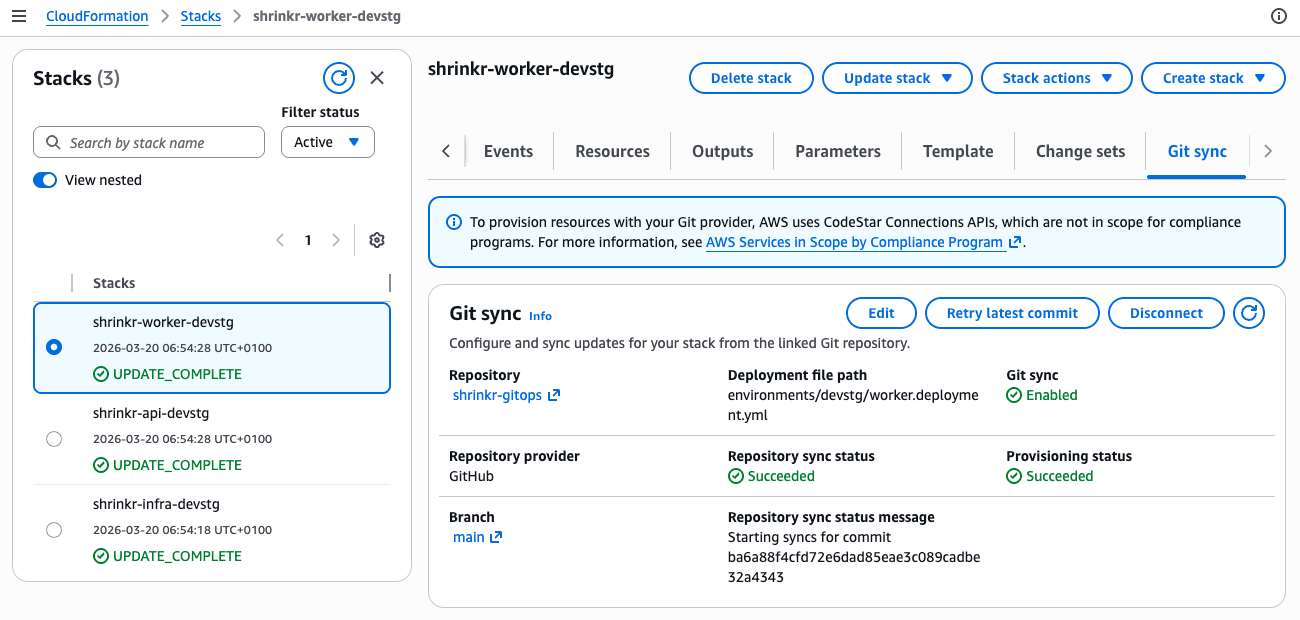
CloudFormation GitSync is a native AWS feature that connects a CloudFormation stack to a file in a Git repository. When that file changes, CloudFormation automatically creates a changeset and executes it. No GitHub Actions, no CodePipeline, no CodeBuild.
Setup requires a one-time bootstrap, which I automated with OpenTofu in a separate shrinkr-bootstrap repository. The bootstrap runs in two phases because the GitHub connection requires manual OAuth approval between them:
- Phase 1 (
connection_approved = false): Creates the CodeConnection (starts in PENDING status), the OIDC provider for CI, all IAM roles (sync, execution, CI), and ECS/ELB service-linked roles. - Approve the connection in the AWS console (OAuth handshake with GitHub).
- Phase 2 (
connection_approved = true): Creates a repository link, CloudFormation stacks as shells (dummy templates), and sync configurations wiring each stack to its deployment file.
The stacks are created with lifecycle { ignore_changes = all } — OpenTofu creates them, then GitSync takes over. The dummy template is just a WaitConditionHandle that gets replaced on the first sync.
After the bootstrap, every merge to main that touches a deployment file triggers a stack update. The flow becomes:
git commit → GitHub webhook → AWS detects change
  → CloudFormation reads deployment file
  → resolves template + parameters (including SSM)
  → creates changeset → executes
  → ECS detects new task definition revision
  → rolling deployment begins
No pipeline to maintain. No CI credits burned on deployments. Just git and CloudFormation.
Promoting between environments
Promotion from devstg to prod is a file operation:
- In devstg, the API has been running
sha-a1b2c3dsuccessfully. - Copy the
ImageUrifromenvironments/devstg/api.deployment.ymltoenvironments/prod/api.deployment.yml. - Open a PR. Get a review. Merge.
- GitSync picks up the change and deploys to prod.
The PR is your change control. The deployment file diff is your audit trail. Rollback is reverting the PR.
Anti-patterns to avoid
The research for this article surfaced patterns that are widespread but problematic. Four stand out:
1. The describe→jq→register chain
Already covered in the opening, but worth restating: never use the AWS API as your source of truth for task definitions. Store them in Git. The amazon-ecs-deploy-task-definition action’s own README says this: “It is highly recommended to treat the task definition ‘as code’ by checking it into your git repository as a JSON file.”
2. The latest tag
Using latest as your image tag breaks release immutability. Two deployments using latest might run completely different code. AWS explicitly warns against this at containersonaws.com. Use commit SHAs or semantic versions — anything that’s immutable and traceable back to source code.
3. Secrets as plaintext environment variables
Fetching secrets from Secrets Manager during CI and baking them as plaintext environment values in the task definition is a security violation flagged by AWS Security Hub. The secret is visible in the console, the DescribeTaskDefinition API, and CloudTrail.
Use the secrets block with valueFrom instead:
ContainerDefinitions:
  - Name: api
    Secrets:
      - Name: DB_PASSWORD
        ValueFrom: !Sub arn:aws:secretsmanager:${AWS::Region}:${AWS::AccountId}:secret:${Environment}/db/password
ECS resolves the secret at container start time via the Task Execution Role. The CI pipeline never sees the value.
4. No deployment concurrency control
Without concurrency limits, two simultaneous pushes to main can trigger two simultaneous deployments to the same ECS service. CloudFormation will reject the second one (stack already in UPDATE_IN_PROGRESS), but the error handling is messy.
For CI pipelines, use GitHub Actions concurrency groups:
concurrency:
  group: deploy-${{ env.ENVIRONMENT }}
  cancel-in-progress: false
For GitSync, the problem is less acute because CloudFormation queues updates naturally. But it’s still worth being aware of — rapid successive merges can create a backlog of changesets.
The gotcha worth its own section: circuit breaker silent drift
This is the most important operational issue to understand when combining CloudFormation with ECS deployments.
When the ECS deployment circuit breaker triggers a rollback, CloudFormation may still report UPDATE_COMPLETE. The circuit breaker operates below CloudFormation’s visibility — it tells ECS to roll back to the previous task definition revision, and CloudFormation sees the service eventually stabilize (on the old revision) and calls it a success.
The result: your deployment file says sha-a1b2c3d, but ECS is running sha-previous. Git says one thing, reality says another. This is exactly the drift that GitOps is supposed to prevent.
This behavior is documented in the AWS containers roadmap (#1205, #1369). AWS has since improved the integration so CloudFormation receives circuit breaker failure notifications in more cases. But the fix isn’t universal — edge cases remain, and a deep dive by CloudGlance documents scenarios where the mismatch still occurs.
Regardless of whether AWS has closed the gap fully, the defensive practice is the same: verify deployments independently. After any deployment, check that the active task definition matches what you intended:
ACTIVE_TASKDEF=$(aws ecs describe-services \
  --cluster shrinkr-devstg \
  --services shrinkr-api-devstg \
  --query 'services[0].taskDefinition' \
  --output text)

EXPECTED_IMAGE=$(aws ecs describe-task-definition \
  --task-definition "$ACTIVE_TASKDEF" \
  --query 'taskDefinition.containerDefinitions[0].image' \
  --output text)

# Compare $EXPECTED_IMAGE against the ImageUri in your deployment file
Treat every UPDATE_COMPLETE as “probably complete” and verify independently. In a future article, we’ll automate this as a post-deployment check.
What’s next
This article covered the foundation: three repos, three stacks, git-driven deployments via CloudFormation GitSync. The companion repos are ready to fork and experiment with:
- shrinkr — Application source code and CI pipeline
- shrinkr-gitops — CloudFormation templates and deployment files
- shrinkr-bootstrap — OpenTofu configuration to bootstrap the AWS infrastructure
But we intentionally left things out. The upcoming articles in this series will add the layers that production systems need:
-
Part 2: Database Migrations on ECS — Adding PostgreSQL to Shrinkr. Alembic migrations as one-off ECS
run-taskbefore service updates. PostgreSQL advisory locks for concurrent migration safety. The expand-contract pattern for zero-downtime schema changes. -
Part 3: Blue-Green Deployments — Moving beyond rolling updates. Traffic shifting with test listeners, canary percentages, and automatic rollback.
-
Part 4: Multi-Service Coordination — When deploying the API and worker together requires ordering guarantees. Service Connect dependency race conditions and how to prevent them.
The GitOps foundation we built here doesn’t change as we add these capabilities. The image tag stays the contract. The deployment file stays the source of truth. The complexity moves into the CloudFormation templates and the deployment strategy — exactly where it belongs.
References
- Terraform AWS Provider — ECS Task Definition and Continuous Delivery (Issue #632, open since 2017)
- AWS Containers Roadmap — Configurable deployment timeout (Issue #328)
- AWS Containers Roadmap — Circuit breaker + CloudFormation status mismatch (#1205, #1369)
- CloudGlance — Deep dive on ECS desired count and circuit breaker rollback
- Salatino, M. — Platform Engineering on Kubernetes (Manning, 2024), Chapters 3-4
- Garbe, P. — Deep dive: ECS deployment with CloudFormation
- AWS — CloudFormation Git Sync documentation
- AWS — ECS Deployment Circuit Breaker